Getting Started
This getting started aims at providing a quick example for compiling FMUs and launching simulations. For simplicity all FMUs are generated from Modelica code. We present two simulation modes Model-Exchange (ME), and Co-Simulation (CS).
- In this example we simulate two FMUs:
- the generator FMU creates a periodic signal,
- the controller FMU output 1 or 0 depending on the generator’s signal and a defined threshold.
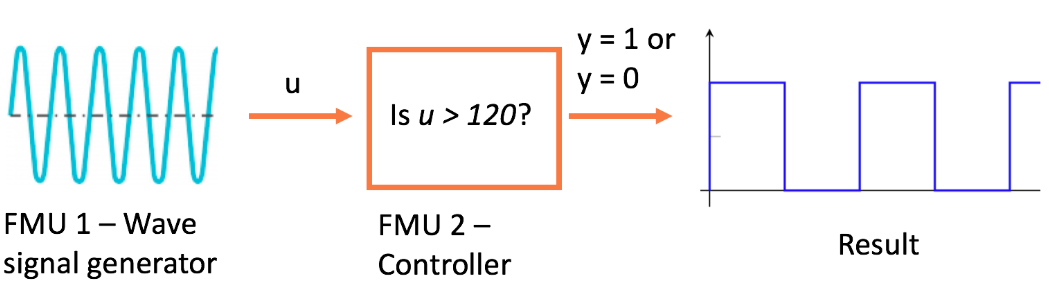
Figure - Getting started example
Installing the right modules
To get started download and install JModelica. For users on Linux and OS X you can install docker and get the JModelica image in a container using:
docker pull michaelwetter/ubuntu-1604_jmodelica_trunk
Model-Exchange with PyFMI
In this example, FMUs are exported as Model-Exchange and therefore do not include a solver. PyFMI (the master) is in charge of solving the problem. The master uses variable time-steps and roll backs to precisely solve this example.
from pymodelica import compile_fmu
from pyfmi import load_fmu
from pyfmi.fmi_coupled import CoupledFMUModelME2

# Compile FMUs from Modelica code
compile_fmu('HELICS_CyDER.Generator',
            'HELICS_CyDER.mo', version='2.0',
            target='me')
compile_fmu('HELICS_CyDER.Controller',
            'HELICS_CyDER.mo', version='2.0',
            target='me')

# Load FMUs
generator = load_fmu('HELICS_CyDER_Generator.fmu')
controller = load_fmu('HELICS_CyDER_Controller.fmu')

# Create the list of FMUs
models = [("generator", generator), ("controller", controller)]

# Connect the FMUs
connections = [(generator, 'y', controller, 'u')]

# Create an instance of the master
master = CoupledFMUModelME2(models, connections)

# Get the options
options = master.simulate_options()
# options['ncp'] = 23  # <--

# Simulate the master instance
result = master.simulate(options=options,
                         final_time=10)

# Terminate FMUs
generator.terminate()
controller.terminate()

# Get the results
me_time = result["time"]
me_controller_y = result["controller.y"]
me_generator_y = result["generator.y"]
Co-Simulation with PyFMI
In this example, FMUs are exported as Co-Simulation and therefore they come with an embedded solver. The PyFMI master algorithm requests FMU to do steps with a given step size (0.5 seconds here). This is less flexible than the previous master, as it can miss events if time-steps are too large. Although, it provides a convenient way to export models with their solver.
from pymodelica import compile_fmu
from pyfmi import load_fmu, Master

# Compile FMUs from Modelica code
compile_fmu('HELICS_CyDER.Generator',
            'HELICS_CyDER.mo', version='2.0',
            target='cs')
compile_fmu('HELICS_CyDER.Controller',
            'HELICS_CyDER.mo', version='2.0',
            target='cs')

# Load FMUs
generator=load_fmu('HELICS_CyDER_Generator.fmu')
controller=load_fmu('HELICS_CyDER_Controller.fmu')

# Create the list of FMUs
models = [generator, controller]

# Connect the FMUs
connections = [(generator, 'y', controller, 'u')]

# Create an instance of the master
master = Master(models, connections)

# Get the options
opts = master.simulate_options()
opts['step_size'] = 0.5

# Simulate the master instance
result = master.simulate(
    options=opts, start_time=0,
    final_time=10)

# Terminate FMUs
generator.terminate()
controller.terminate()

# Get the results
cs_controller_time = result[controller]["time"]
cs_controller_y = result[controller]["y"]
cs_generator_time = result[generator]["time"]
cs_generator_y = result[generator]["y"]